 Skip to content

iCarsoft MB V3.0 vs MB V4.0: Which Mercedes Diagnostic Scanner Should You Choose?
Comparing the iCarsoft MB V3.0 and MB V4.0 comes down to the interface, update process, vehicle coverage, and the extra diagnostic features you may need.
The MB V3.0 uses physical buttons and computer-based updates. The MB V4.0 adds an Android-based platform, a larger touchscreen, built-in Wi-Fi updates, an internal battery, and downloadable software for two additional vehicle brands.
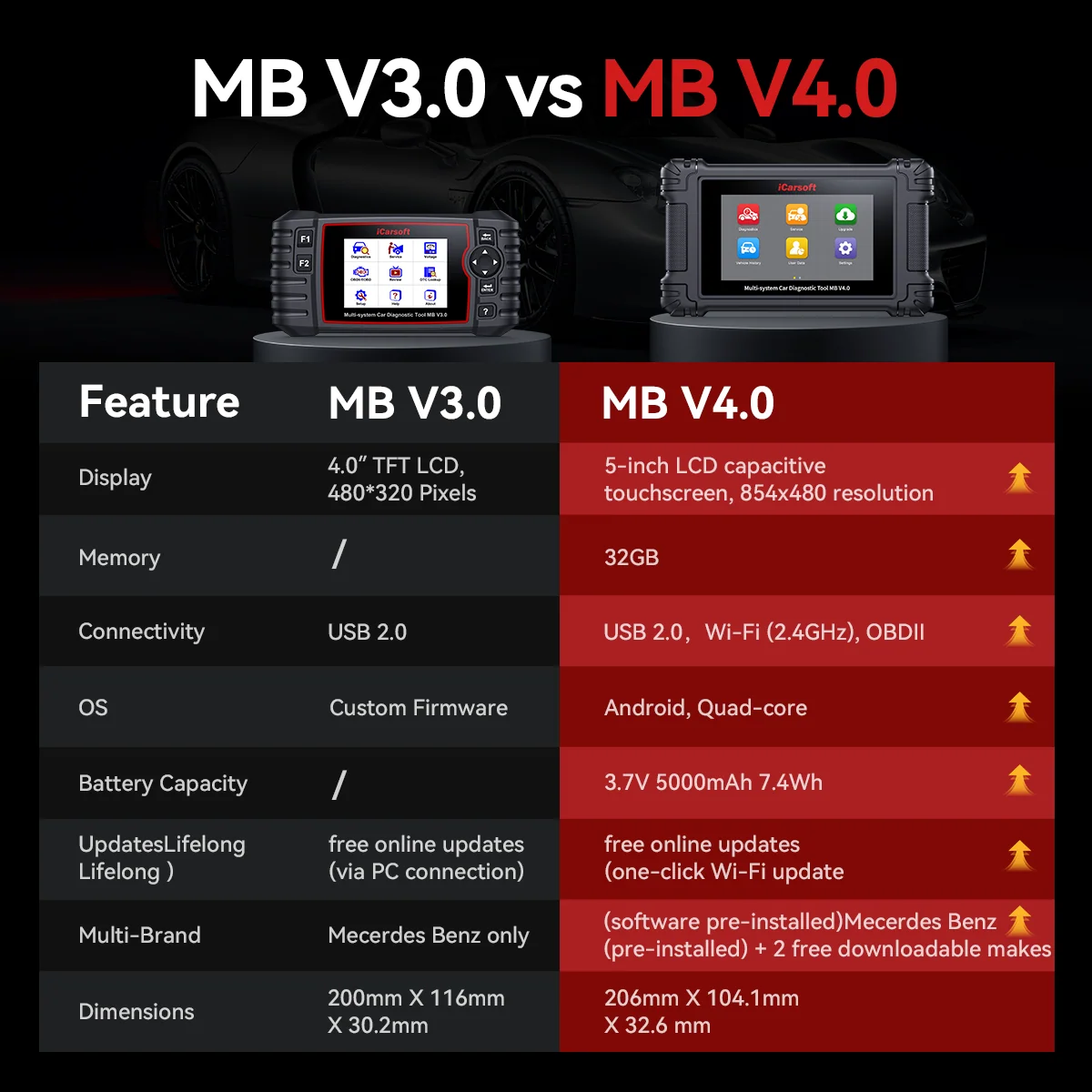
Quick Comparison: MB V3.0 vs MB V4.0
Both scanners are intended for diagnostics on supported vehicles in the Mercedes-Benz family. The newer MB V4.0 has a different interface and additional features, but compatibility still depends on the vehicle and the specific diagnostic function.
| Feature | iCarsoft MB V3.0 | iCarsoft MB V4.0 |
|---|---|---|
| Interface | Traditional handheld design with physical buttons | Android-based platform with touchscreen |
| Display | 4-inch display | 5-inch touchscreen |
| Software updates | Windows PC and USB connection | Built-in Wi-Fi updates |
| Internal battery | No equivalent internal battery is listed in the official comparison | 5,000 mAh internal battery |
| Additional vehicle brands | Dedicated coverage for supported Mercedes-Benz family vehicles | Two additional vehicle-brand software downloads are listed by the manufacturer |
| High-voltage battery monitoring | Not listed as a V3.0 feature in this comparison | Available for supported EQ and hybrid models |
| Software updates | Free lifetime software updates, according to the manufacturer | Free lifetime software updates, according to the manufacturer |
1. Display and User Interface
The MB V3.0 uses a traditional handheld layout with physical buttons and a 4-inch display. The MB V4.0 uses an Android-based platform and a 5-inch touchscreen. The larger touch display may be more convenient for users who prefer touch controls and a more modern interface.
2. Software Updates: USB vs Wi-Fi
The MB V3.0 requires a Windows PC and USB connection for software updates. The MB V4.0 supports updates through built-in Wi-Fi, according to the manufacturer. If you prefer to update the scanner without connecting it to a computer, this is one of the clearest practical differences between the two models.
The manufacturer lists free lifetime software updates for both scanners. Check the official product information for current update instructions and requirements.
3. Vehicle Coverage and Additional Brands
Both models focus on compatible Mercedes-Benz family vehicles, including relevant Sprinter and Smart applications. The MB V4.0 also offers software downloads for two additional vehicle brands, according to the manufacturer. Confirm which brands and functions are currently available before treating this as a deciding factor.
4. Hybrid and High-Voltage Battery Features
The manufacturer lists high-voltage battery monitoring for supported EQ and hybrid models for the MB V4.0. This may matter to owners working with compatible vehicles, but the exact vehicle and function coverage must be checked before purchase.
5. Internal Battery and Portable Use
The MB V4.0 includes a 5,000 mAh internal battery. The official comparison does not list an equivalent internal battery for the MB V3.0. According to iCarsoft, the internal battery allows the V4.0 to remain powered after it is disconnected from the vehicle, which can be useful when reviewing recorded live-data logs away from the car.
This convenience is separate from diagnostic coverage: an internal battery does not, by itself, mean a scanner supports more vehicle systems.
6. Diagnostic Functions for Mercedes-Benz and Sprinter
The manufacturer highlights several vehicle-specific functions for the MB V4.0, including:
- NOx sensor reset.
- AdBlue/SCR reset.
- Diesel particulate filter (DPF) regeneration.
- Selected adaptations and teach-in procedures.
- High-voltage battery monitoring for supported EQ and hybrid models.
Function availability depends on the vehicle. If you need a specific operation, such as an AirMatic calibration, AdBlue reset, or DPF regeneration, confirm support for your vehicle's VIN before buying.
Pros and Cons
Where it may fit
- Traditional interface with physical buttons.
- Dedicated focus on compatible Mercedes-Benz family vehicles.
- Free lifetime software updates, according to the manufacturer.
- May be sufficient if you do not need the newer model's additional features.
Things to consider
- Smaller 4-inch display.
- Updates require a Windows PC and USB connection.
- The additional-brand download capability and high-voltage battery monitoring listed for the V4.0 are not listed as V3.0 features here.
Where it may fit
- Larger 5-inch touchscreen.
- Android-based platform and built-in Wi-Fi updates.
- Two additional downloadable vehicle brands listed by the manufacturer.
- Internal 5,000 mAh battery.
- High-voltage battery monitoring for supported hybrid and EQ vehicles.
- Free lifetime software updates, according to the manufacturer.
Things to consider
- Some added features may be unnecessary if the V3.0 already meets your needs.
- Vehicle and function compatibility still needs to be verified.
- Confirm additional-brand availability if it affects your decision.
Which iCarsoft Scanner Should You Choose?
Choose the MB V3.0 if:
- You prefer physical buttons over a touchscreen.
- You mainly work with compatible Mercedes-Benz, Sprinter, and Smart vehicles.
- You are comfortable updating software through a Windows PC.
- You do not need the newer model's additional-brand options or high-voltage battery monitoring.
Choose the MB V4.0 if:
- You prefer a larger touchscreen and Android-based interface.
- You want to update software directly over Wi-Fi.
- You want the option to add two additional vehicle brands.
- You need high-voltage battery monitoring for a supported hybrid or EQ model.
- You value the flexibility of an internal battery for reviewing diagnostic data.
The V4.0 offers more features on paper, but the best choice depends on whether those features are relevant to your vehicle and the work you need to perform.
Frequently Asked Questions
Is the iCarsoft MB V4.0 better than the MB V3.0?
The V4.0 offers an Android-based platform, a larger touchscreen, Wi-Fi updates, additional vehicle-brand options, an internal battery, and high-voltage battery monitoring for supported vehicles. The V3.0 may suit users who prefer physical buttons and do not need those additional features.
What is the main difference between the MB V3.0 and V4.0?
The main differences are the interface, update method, vehicle-brand options, internal battery, and selected diagnostic capabilities. The V3.0 uses physical buttons and computer-based updates, while the V4.0 has a touchscreen and built-in Wi-Fi.
Does the MB V4.0 require a computer for updates?
According to the manufacturer, the V4.0 supports software updates through built-in Wi-Fi. The V3.0 requires a Windows PC and USB connection for updates.
Are software updates free on both scanners?
The manufacturer's comparison states that both models include free lifetime software updates, with no annual software update subscription fee.
Can the MB V4.0 diagnose vehicles other than Mercedes-Benz?
The manufacturer lists software for Mercedes-Benz, Sprinter, Smart, and Maybach, and states that users can download software for two additional vehicle brands at no extra charge. Confirm current availability and supported functions before purchasing.
Does the MB V4.0 support Mercedes-Benz EQ and hybrid vehicles?
The manufacturer lists high-voltage battery monitoring for supported EQ and hybrid models. Exact coverage depends on the vehicle and diagnostic function required.
Does the MB V4.0 work with Mercedes-Benz Sprinter vans?
The manufacturer lists dedicated Sprinter coverage, including selected functions such as DPF regeneration, NOx sensor reset, and AdBlue/SCR reset. Support varies by vehicle and model year, so verify the specific function before buying.
Should I upgrade from the MB V3.0 to the MB V4.0?
An upgrade may make sense if you want Wi-Fi updates, a touchscreen, additional vehicle-brand options, or high-voltage battery monitoring. If the V3.0 already performs the functions you need, compare the upgrade cost against the practical value of those features.
How do I check whether a scanner supports my Mercedes-Benz?
Check the manufacturer's compatibility information and confirm the exact vehicle model, year, chassis, and diagnostic function you need. If necessary, contact iCarsoft support with your VIN before placing an order.
Final Verdict: MB V3.0 or MB V4.0?
The iCarsoft MB V3.0 remains an option for Mercedes-Benz owners who prefer a traditional handheld scanner and do not need the newer model's additional capabilities.
The MB V4.0 offers more flexibility through its touchscreen interface, wireless updates, internal battery, additional-brand software options, and selected hybrid diagnostic features.
If those improvements match your needs, investigate the V4.0 first. If not, the V3.0 may still be worth considering. Before deciding, verify compatibility with your vehicle and compare current prices, included accessories, and availability.
